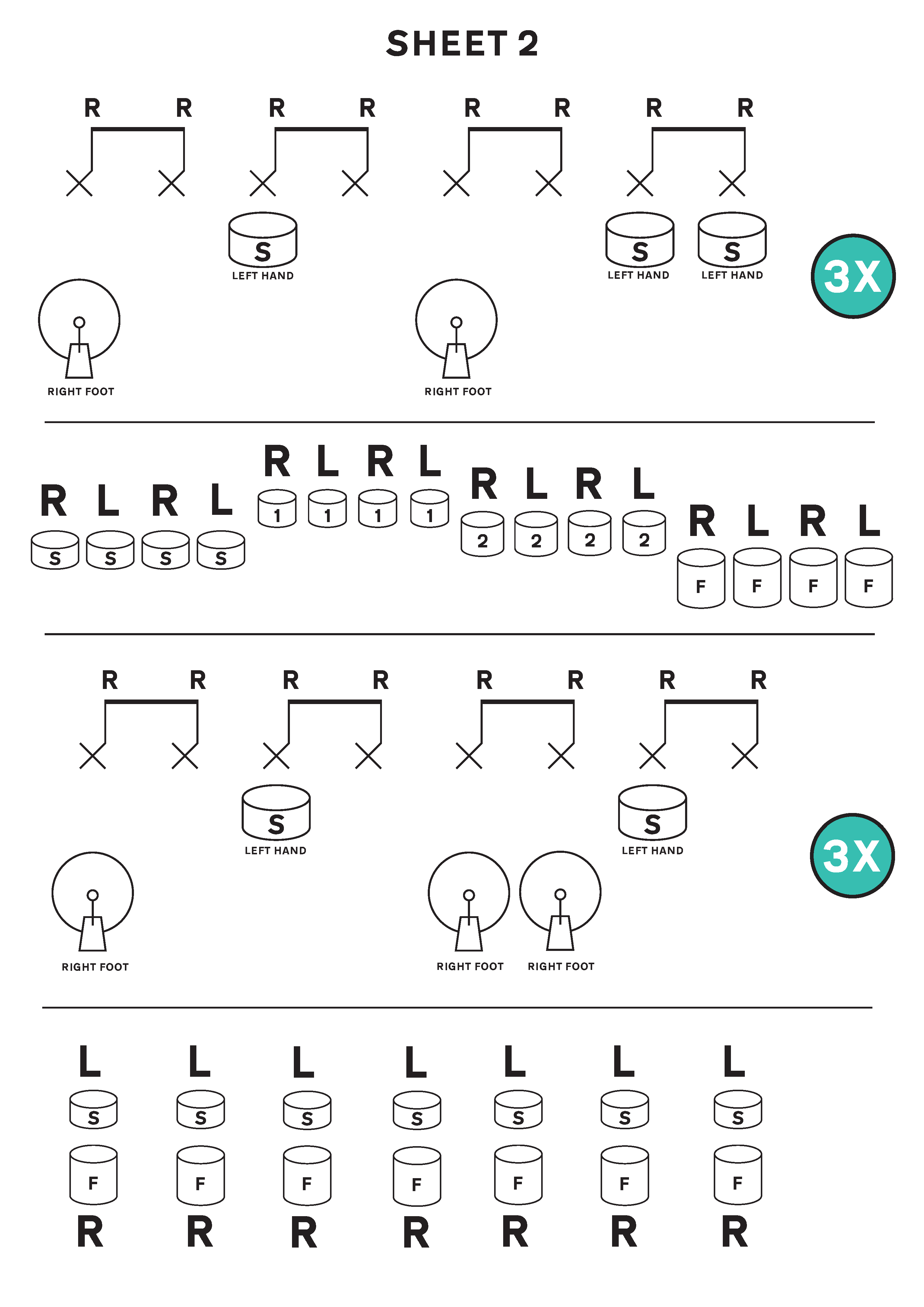
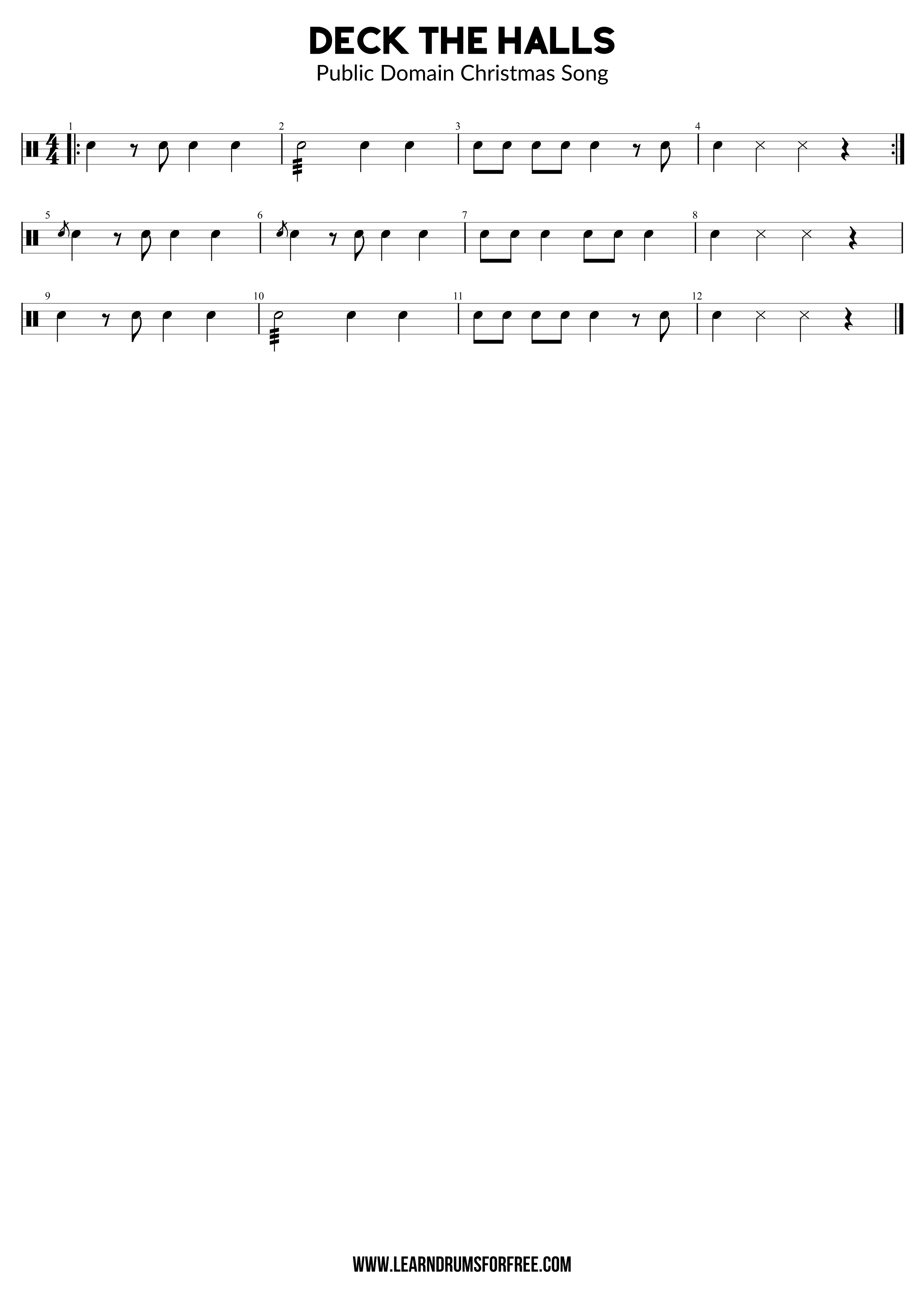
Sheet 2 – Easy Reading Beats & Fills

Here we have a drum beat repeated 3 times, then a fill, then another drum beat 3 times followed by another drum fill. The sheet can be then repeated around multiple times, or you could just repeat the first half around for a while and then focus on repeating the second half.

These are great for beginners and especially for those that haven’t moved on to reading drum sheet music properly yet. It will help those that struggle to read the drum music, for example young drum students.

Right handed drummers should play all of the hi hats with their right hand, and all of the snare drums with their left hand. Left handed drummers should do the opposite.


Related: Sheet 1 – Easy Reading Beats & Fills
Related (Premium): This free drum sheet is part of a premium ebook, which you can purchase here: First Drum Book – Easy Reading Beats & Fills

Sheet 1 – Easy Reading Beats & Fills

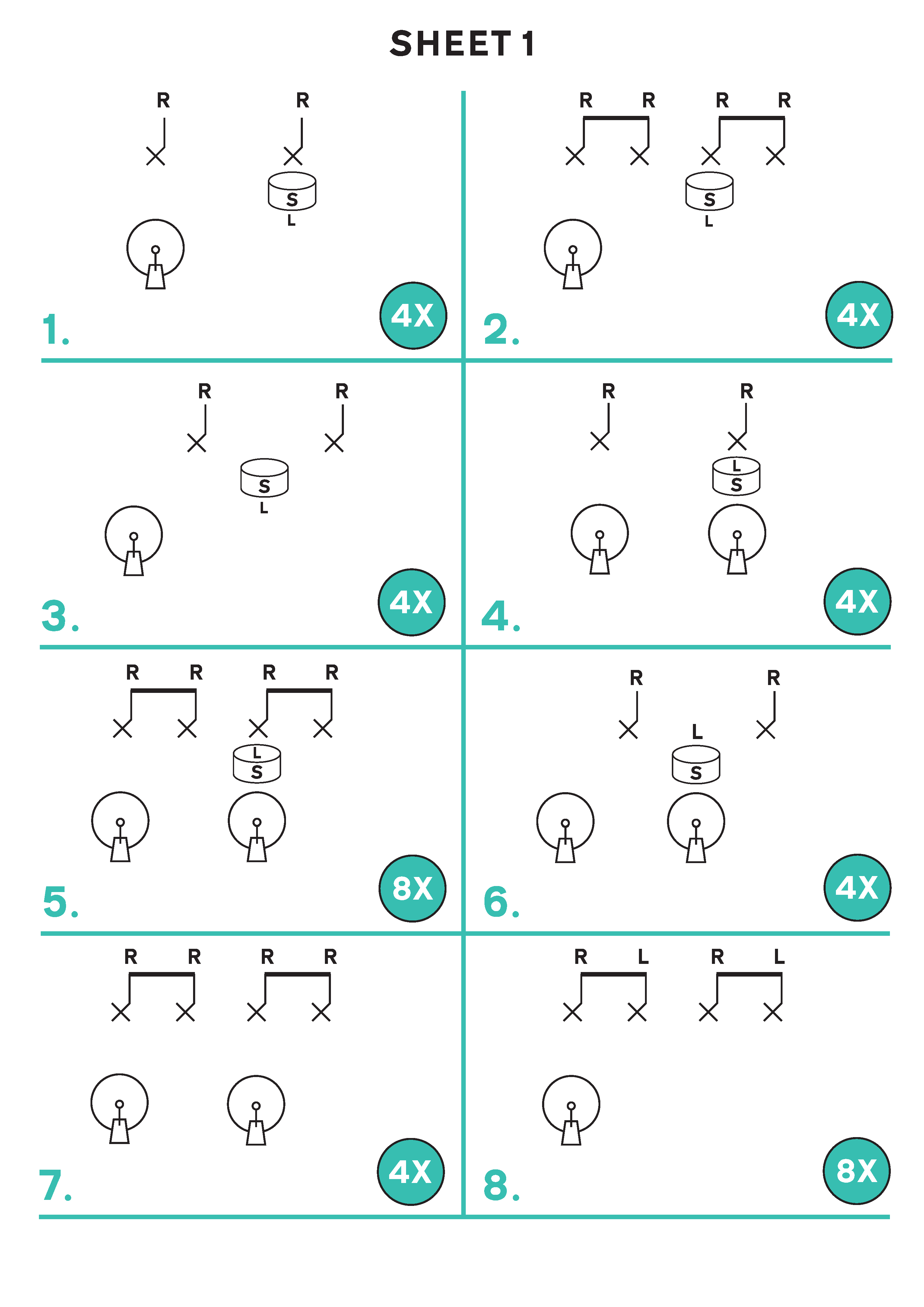
Here we have 8 drum beats, each lasting half a bar each. We’ll play them each 8 times, which will total 4 bars worth for each beat.

There are 3 drum voices; Hi Hat (the X‘s), Snare Drum (the drum with an S in it), and the Bass Drum / Kick Drum (the one that has a pedal attached to a circle).

These are great for beginners and especially for those that haven’t moved on to reading drum sheet music properly yet. It will help those that struggle to read the drum music, for example young drum students.

Right handed drummers should play all of the hi hats with their right hand, and all of the snare drums with their left hand. Left handed drummers should do the opposite.


Related: Sheet 2 – Easy Reading Beats & Fills
Related (Premium): This free drum sheet is part of a premium ebook, which you can purchase here: First Drum Book – Easy Reading Beats & Fills

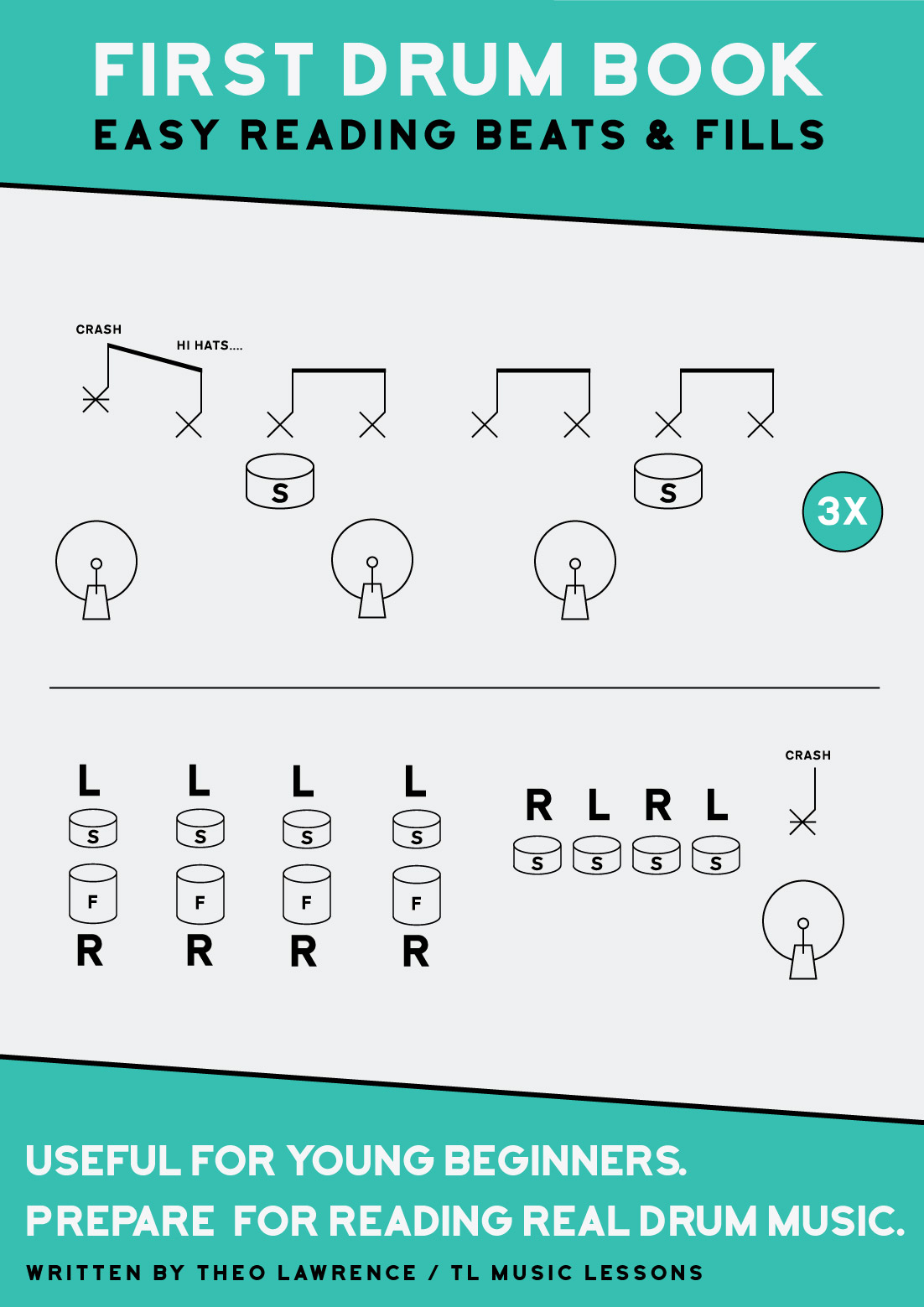
(Premium) – First Drum Book – Easy Reading Beats & Fills

Buy Now →

For a free preview of the ebook, click Buy Now and then click ‘Preview’ at the top left of the cover image.

  • 28 Pages
  • 20 Drum Lesson Exercise Sheets

Introduction

People that might find this book useful

  • All ages will be able to enjoy this book as the drumming content will be a challenge for any beginner.
  • Beginners at ages 5-11 should benefit the most from these sheets when starting out, as they take away a lot of the initial reading difficulties.
  • Drum teachers can print the book or single sheets for their students. They can be taught to beginners of any age and also to very young beginners that wouldn’t otherwise understand some of the standard drum notation – especially the drum fills.
  • Drummers can teach themselves to play the drums using the easy to read music

About the book

This ebook has been created after nearly 9 years of teaching the drums and after many of these years developing my own way of writing drum music for beginners so that they could focus on the drumming rather than getting stuck working out which drum to hit. I noticed this problem with almost all of my drum students of school ages from ages 5 to 11 especially (these are the ‘Primary School’ ages in the UK).

After planning to write this book over a year ago, I have been handwriting similar types of sheets and photocopying them for my students to test the water and see which exercises work best. It’s really quick to write out your own sheets and I do encourage writing out your own by hand if there is something that you want to either teach or remember for yourself to play, that doesn’t appear in this book. All you need to do is draw out the symbols as they appear in this book, just on a blank sheet of A4 with any type of pen (I like using a think pen like a permanent marker so it stands out).

Following on from honing the hand drawn drum exercises, they have been recreated using Adobe Illustrator to give them a clean look and so that they are easy to read and well presented as an ebook.

This ebook should get students familiar with how real drum music is laid out, because I have kept everything the same really. So, when moving on to trying to read real drum sheet music, it should start to make sense a lot quicker than usual. My next ebook to try after this might be Beats And Fills Drum Book – Basic Beginners because it covers most of the content again in a different way but this time with real drum sheet music notation.

You are freely welcome to print this ebook for personal use or for giving a copy to your students if you are a teacher, but please do not redistribute the .pdf file online.

Buy Now →

How To Read Dynamics in Music

Here is a list of dynamic markings you might encounter in drum sheet music. This list will be updated as more dynamic markings are thought of, and will start out as a basic list of fundamental dynamics notation.

  • pp (pianissimo = very soft/quiet)
  • p (piano = soft/quiet)
  • mp (mezzo piano = medium quiet / medium soft)
  • mf (mezzo forte = medium loud)
  • f (forte = loud)
  • ff (fortissimo = very loud)
  • a wide version of this shape: < (crescendo = gradually getting louder)
  • a wide version of this shape: > (diminuendo = gradually getting quieter)
  • > these arrows above the notes are accents, which indicate that you play loud on this note only.

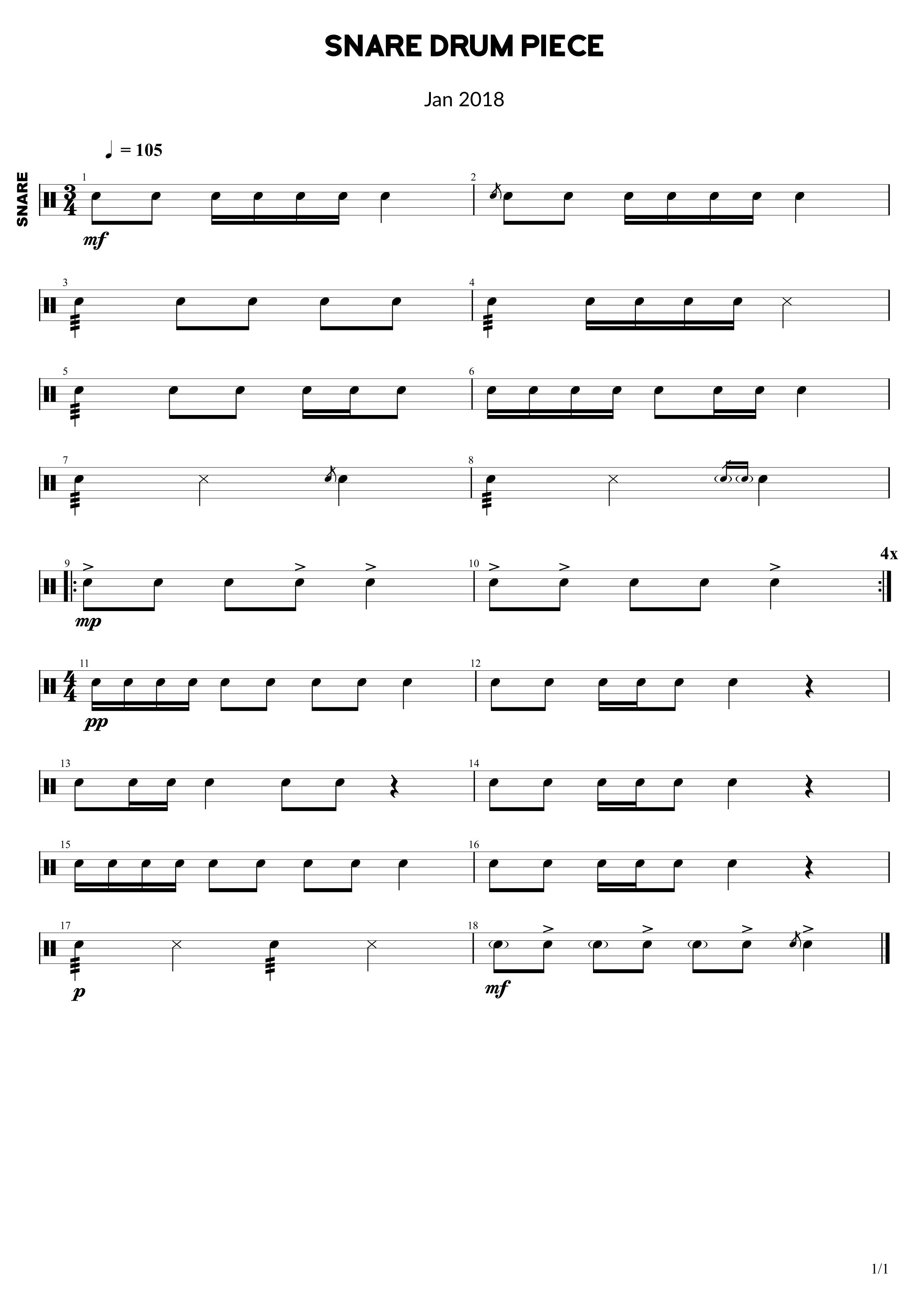
(Premium) – 10 Snare Drum and Floor Tom Pieces – Book 1

Buy Now →

Summary

This book was written over the course of 1 year for a group of youth drummers (Montgomeryshire Youth Music Drumline) in Powys, Wales. I have compiled the year’s pieces into an ebook that can be used by other drum teacher, or by self taught drummers. The pieces are similar to Snare Drum Sheet Music style pieces, but with the added timbre of a floor tom. You can achieve quite an epic cinematic sound by combining the two drum voices in unison. Difficulty levels from Grade 1 to Grade 3-4.

People that might find this book useful

  • Drum groups, drum workshops and drum ensembles – Youth groups or adults
  • Drum teachers are completely free to print the book or single sheets for their students.
  • Drummers can teach themselves following on from a strong basic foundation in reading and playing
  • Drummers that need to perform for school or competition etc.
  • Drummers looking to improve their rhythms for drum fills and snare drum sheet music
  • Groups of drummers can perform together using a snare and floor tom each, or by using any other two drums

Rules for sharing this content

When you purchase the book, you will receive a .pdf file that you can keep and use forever.
You can email the .pdf file privately to your students
You can print out unlimited copies for your students or for yourself
You cannot resell the .pdf or distribute the .pdf file online in any way (not even for free). This also applies to exported images, photos or scanned copies of the book

About the book

The 10 pieces are performance pieces for drums, with no backing. Drum groups, or individual drummers can perform these pieces. They have been written to sound good as standalone pieces – they are not just practice exercises. The pieces do not focus on many dynamics, but they do cover many techniques, rhythms and some rudiments, from quarter notes to sextuplets and triplets, and from flams to drags and buzz rolls.

Some of the pieces have multiple parts, which may be played together. So, if your group has varying ability levels, some can play part 1, some part 2, and some part 3. Not all the pieces have 2 or 3 parts. Please check the contents page to match up the pieces. I have compiled the book in order of difficulty. The levels go from about grade 1 up to grade 3-4 level.

Reading Tip: I developed the writing over the year. For pieces with two stave lines – the top line is the snare and the bottom line is the floor tom.

Final Thoughts

This book is a follow on from “10 Snare Drum Pieces – Book 1”, written in 2015. That book was for snare drum only, and in the last 2 years has been purchased by 60 people from all around the world, many of which are teachers themselves who are using the book to teach their students or drum groups with.

I hope this new ebook will inspire more groups of this type. I’m sure it’s not the first time it’s been done with groups of drummers, each playing a snare and floor tom, but I do think it is very rare to see it. I hope to inspire other groups to adopt this idea. I’m sure this won’t be the first and last book of it’s kind, because I intend to continue teaching the MYM Drumline for many years to come, and I will be writing new pieces for the group regularly.

Recommended reading for use with this ebook:
Accent Techniques – Down, Tap, Up, Full Strokes
Reading Buzz Rolls And Double Stroke Markings

Buy Now →

30 essential productivity apps, business management tools and other apps or websites that help to run an online business and a local music teaching business

Here is a list of 30 essential productivity apps, business management tools and other apps or websites that help to run an online business and a local music teaching business.

The list here is what suits me and keeps me going as an individual business. There are other things I use but these are the main ones. These may not be suitable for everyone but they are all things that I happily recommend to others. Some are obvious, like the google products, but you might find a few that you haven’t heard of in the list.

Below the list is more information about how I use the things in the list to operate my businesses.

1. Google Calendar & synced to phone calendar (scheduling and also useful for setting reminders at specific times)
2. Google Docs / Spreadsheets (for creating invoices, records of who has paid, income spreadsheets). For offline and advanced database use, Libre Office Sheets and Calc are free and are just as good as Word and Excel imo.
3. Google Drive (access everything on the move; lesson plans, ebooks, records of who has paid invoices)
4. Google Keep (for saving photos or notes on the move)
5. Gmail (email)
6. Google Maps & Belkin Phone Holder (replaced sat nav)
7. Google Contacts (can group contacts into categories such as school names)
8. Remember The Milk (to do list, web and mobile app)
9. Mailchimp (mailing lists)
10. Payhip (for selling ebooks)
11. Paypal (payment processing)
12. Bandcamp (for audio downloads)
13. Ditto Music (digital distribution for music)
14. Sentric Music / Hit Licence (pitching music to tv / film etc)
15. BBC Weather Web / App (Try to dress for the weather)
16. WhatsApp (Reluctantly stay in close contact for certain projects)
17. Adsense (advertisement revenue)
18. Phone’s native clock, countdown timer and calculator
19. Heart Internet Web Hosting and Domains (to power the websites)
20. Drupal & WordPress (CMS for websites)
21. Spotify (always have access to songs that I need to teach)
22. DaTuna app (tune guitars using phone – android)
23. Justin Guitar metronome app
24. Abelton Live 9 (Suite) – Education Price (DAW for making music)
25. Dropbox or Wetransfer.com (sending / sharing large files)
26. Landr (Cheap and Easy Mastering Service)
27. Adobe Photoshop & Adobe Illustrator (for all artwork needs such as posters, music artwork, ebook covers, web banners etc.)
28. Adobe Acrobat Pro (for creating ebooks from single pdf files)
29. Guitar Pro (for creating lesson plans and sheet music for ebooks)
30. Quickbooks Self Employed (Used for Invoicing students’ parents every half term and for forwarding email receipts to record them in Quickbooks. It is basic, but it suits my needs.)


I do most of my work from a desktop computer. It’s pretty old school I know but actually I like sitting down at the desk and getting immersed and then being able to walk away and leave it, rather than have the temptation of trying to work on the sofa (I know some people that prefer the sofa though!). I keep my mobile contract slim and use a cheap to mid range phone, which is a smart phone, but it doesn’t cost loads.

My bookkeeping, teaching schedules, invoices, paid lists, have all been done using my own system of documents and spreadsheets that are quite refined and easy to use for my business now. I have recently moved onto Quickbooks Self Employed for invoices, which has made writing and sending them easier. My process to record payments for school lessons used to be to input it into a spreadsheet, then copy and paste into a ‘paid’ documents file for each given half term and school, and delete the pupil’s name that has been paid for. I would then check who still needs to pay. My invoices use a template I made and I had a copy of that in the same folder as the paid file for each half term and school name. The invoices always include payment info and at the top of that list is bank transfer details because that form of payment has the least admin for me. I then export that as a pdf file and email the parents at the start of a half term. Mostly I have to make different ones for each half term and ammend for different pupils if they have missed lessons or have not paid for a half term.

I also have a spreadsheet of all of my pupils in each school and their instrument and time details, and rows of checkboxes so I can print them off and use them as a rota for the half term. In high schools the rotas need to have time slots added to the rota. For primary schools, they are too hectic and unpredictable to make rigid timetables for, so I don’t bother. At the start of a new half term, I will copy over all the files from the previous half term and begin editing them for the next one. Usually the amount of weeks per half term changes so there is always something to change. I leave an extra list of pupils per school in the paid files so that I can copy them into a fresh ‘unpaid’ area below, and then I can delete them off as they pay.

I keep an up to date copy of parents’ email addresses in Google contacts and group them into different schools and also give them instrument tags incase I need to email all of the guitarists for something at once. I always try to email the parents using the bcc send field, and this is easy on a computer with a mouse because you can select all the contacts from google contacts, and click to send email, then drag all the addresses into the bcc field. I also have a mailchimp list but it’s not easy to keep that updated as well so I tend not to use it. I do for my website subscribers though.

For my websites www.learndrumsforfree.com and www.learnguitarforfree.com most of the files are hosted on the websites. I learned how to make websites before starting to teach, which has really given me the tools to build an online business too. I learned html and css using an O’Reilly book and the rest followed from there. Actually it all started from the coding features on myspace when bands could change the styles on their pages and adding in banners etc. My sister does web design and artwork in the music industry and she said that probably started her off too, or gave her the coding bug. I use dreamweaver to edit code because the colours are useful, but other free ones are available, and filezilla for ftp file transferring.

I use payhip for all of my pdf ebooks, which is the best I have found. It links to paypal for payments and it has just added a feature to automatically add customers to mailchimp lists. People that download free ebooks are added to my regular subscriber list for upadtes of free blog posts, and paying customers are added to a special list, which I send info of new ebook products to when they are released. Bandcamp is used in a similar way for audio and music, although their mailing list integration is not as good so I can’t really use that effectively at the moment unless I set up more accounts and then export email addresses to the appropriate subscriber lists.

I have found that social media is pretty much a waste of time for my online business at the moment but the mailing list is great, and actually pinterest generates the most hits, so I do chose to get rid of all but the pinterest. It’s all about finding what works for your business and choosing the right platforms to get the most out of your time and effort.

I get many hits per day on both sites quite often and almost all the traffic is organic from search engines. It’s taken years to build up so it really is a lot of hard work but adding to it “little and often” really helps build up a huge site over time. Most of my ebook sales follow searching for free stuff from organic google searches and then discovering the ebooks. I believe this is called a “fremium” business model. When I launch a new ebook and send it to my paying customers mailing list, I usually get quite a few sales from them, so that is really useful for me and them.

Hopefully this gives gives you ideas for your own online business. I tried in the past setting up my own ubercart shopping cart and hosting everything myself, but I had to switch to payhip due to new EU tax rules on digital products. It was too hard to manage myself but payhip and bandcamp both sort sll this out for you. For every ebook sale, payhip takes off the tax, which is different depending on each country, from the money I receive, so they literally take care of everything without me needing to register to pay tax in every country. It completely took the hassle away from thiose new laws.

I also make music and play in a band so I have an unlimited ditto music subscription to release to spotify and itunes etc. whilst bandcamp is the best, not all customers are used to that so you kind of have to make things available where the customers are.

Guitar Pro is the best in my opinion! I’ve tried Sibelius but that’s probably only better for orchestral stuff. Guitar Pro is amazing for most instrumentsl sheet music writing, including guitar, drums, ukulele, bass and even instruments such as flute and piano. I always use it for all of my sheet music. I even use it to export midi to Abelton sometimes, rather than using the piano roll to input midi.

Abelton has been great for making music from midi, recording my own music, making backing tracks, and for teaching other music production. The education price helped me to buy it. Landr is a quick, easy and cheap way to finish off tracks so they are ready to release. The mastering is pretty good. I subscribe for a month and then cancel it when I am done.

All of the chaos that is my schedule is fairly organised with Remember The Milk and Google Calendar. Both can set tasks and appointments to repeat weekly or as often as needed, which is really useful. I use both services on the desktop and synced to my phone. My email is also really important for my business. I sometimes send emails to myself with important TO DO list items for that day, so I can’t possibly miss them.


Related: 10 tips and advice for running your own drum teaching business

Computer Games Music – PDF Ebook – Drum Sheet Music [includes Drum Loops Pack]

Get The Free Download (Audio & Sheet Music) from Bandcamp →

Also available for Guitar, Bass, and Ukulele

Full drum sheet music for 9 computer music songs transcribed from the MIDI drum loops used on the album ‘Computer Games Music’ by TL Music Lessons.

Also includes drum loops MIDI and Audio pack.

Audio on Spotify

About the Sheet Music

The drum sheet music has a wide range of ability levels from complete beginner (Canon in C), right up to grade 8 with some complicated syncopation at high speeds. All of the drum loops were created specifically for these songs, by me, a drummer! Hence, I tried to make the majority of the beats playable by a real drummer. I was able to transcribe and transpose most of the beats without altering them, but there were some that would need extra hands, such as the hand claps and clave polyrhythms, so these have been left out or modified where I thought appropriate.

I think this book would be usefuly for anyone wanting to enjoy playing drums along to music whilst reading drum sheet music at the same time. Whilst I can transcribe known songs, this was fun for me to do and release to you, without having to worry about copyright issues.

These could potentially be used as performance pieces in schools, or maybe even exams as a free choice piece if you ask an exam board. Feel completely free to use the audio as a backing track by downloading it from itunes or bandcamp etc and usin it to play along with.

Music makers and music producers can feel free to use the drum loops audio and midi as they wish. You may freely use them in your own compositions. School pupils may also use the drum loops pack as they wish for school projects or coursework – just ask your teacher if this is ok and within any guidelines.

About The Music

Last year I made an album of 10 songs to teach with, and created 6 ebooks for the instrument parts. This year, I made an album of 11 songs called ‘Computer Game Music’.

This year I exported the MIDI files from 8 of those songs, plus 3 new ones, and began adding synths to the MIDI in my music production software Abelton Live 9 to create music that I think would sound good in computer games. I found it quite easy, quick and enjoyable to do when I initially messed about with one of the songs for fun. I then decided to start the project, which only took about a month of spare time to create the new album of songs. I also added drums and bass guitar to the tracks to finish them off.

The drums were created by me in Abelton using the MIDI piano roll and a drum rack. I really enjoyed this! I then transcribed the drum loops into actual drum sheet music for people to learn to play along with the music if they wanted to.

The drum sheet music has a wide range of ability levels from complete beginner (Canon in C), right up to grade 8 with some complicated syncopation at high speeds. All of the drum loops were created specifically for these songs. I tried to make the majority of the beats playable by a real drummer. I was able to transcribe and transpose most of the beats without altering them, but there were some that would need extra hands, such as the hand claps and clave polyrhythms, so these have been left out or modified where I thought appropriate.

Music makers and music producers can feel free to use the drum loops audio and midi as they wish. You may freely use them in your own compositions. School pupils may also use the drum loops pack as they wish for school projects or coursework, if this is within the guidelines of the work.

I hope that the songs can be used by a range of abilities. I would say most or all ability levels would find challenges throughout the album, depending on which instrument you look at. They are all quite challenging in places.

I hope that the songs can be used by more advanced players. Initially the previous album of music was created for grades 1-3 (guitar and ukulele only), but now for this new one, I would say most or all ability levels would find challenges throughout the album, depending on which instrument you look at. They are all quite challenging in places.
I also hope that the songs can be used as backing tracks for performances, for example in schools, and possibly as part of marked school performances or maybe even as free choice pieces in grade exams.

I also hope that my students will enjoy listening to the album after getting to know the songs in their different style.

Whilst the songs have not been created for any particular computer game, I will try to get some of the music featured in actual games. I think they would work well with platform and retro type games.

Accent Practice Exercise for Snare Drum

This exercise was created to support the learning of playing paradiddles with accents along with a metronome at 70bpm in the Grade 2 Rockschool technical exercises 2012-18 syllabus. I have also suggested to try practicing the sheet between 60 and 120bpm, with or without a metronome. 75-120bpm would be pushing the ability level up to at least Grade 3-4.

It can be hard to play paradiddles with a metronome at first, and if you haven’t worked with a click much before it’s also hard for 16th notes and 8th notes. This exercises works on playing 16th notes with a right, left, right, left sticking to get used to this. Then when you take away the left hand, you are left with right hand 8th notes, which is why they are the foundation of this exercise (first and 3rd line).

On the second line, the R L R L sticking on the 16ths prepares the drummer for the transition to 16ths from 8th notes before going from 8ths to paradiddle 16th notes in line 4. Then with the repeat the first 2 lines are there to settle in to the transitions again. By the end of the exercise the paradiddles exercise should become much easier. The actual grade 2 drums rockschool technical exercise is line 4 played twice.

HAIM uses Bass Drum, Toms and Rims to interesting effect in this supurb live music video

The drums in this video are towards the end of the song, but if you have time, watch it from the start because the drums have more effect when you’ve got into the song.

When you hear layered drums on recordings, this is a visual representation of how these types of sounds are acheived. What you see in the video is the actual audio you hear too, much to my suprise and delight because so many other music videos are usually mimed to a studio recorded song. After tentatively reading the comments for the video, it appears to be general consensus that this ‘live version’ is better than their other studio recorded version (later released), which to me is a reference to live music being the winner over studio production.

So, enjoy this video, in all it’s glory, of a truely live recording executed supurbly.

WATCH: